On 04/11/2026, GitHub was hit by an incident affecting Pull Requests, Git Operations, Issues, Actions, and API Requests. The incident began at 09:49 UTC and was resolved at 11:50 UTC the same day.
What Is Happening?
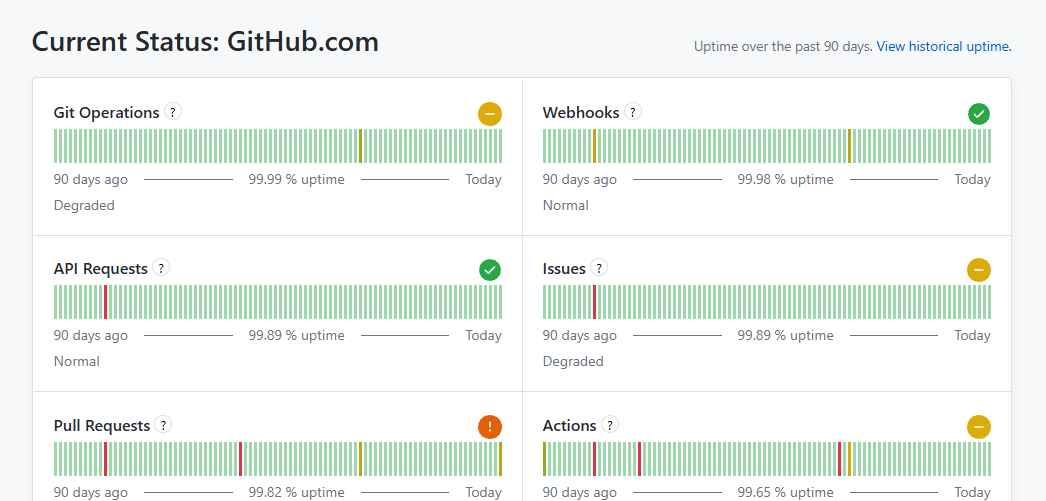
According to GitHub’s official status page, Pull Requests is partially disrupted (partial outage), while Git Operations, Issues, and Actions are experiencing degraded performance. Git Operations handles clones, pulls, pushes, and related git operations, so it is the part most developers feel.
GitHub has posted 9 updates:
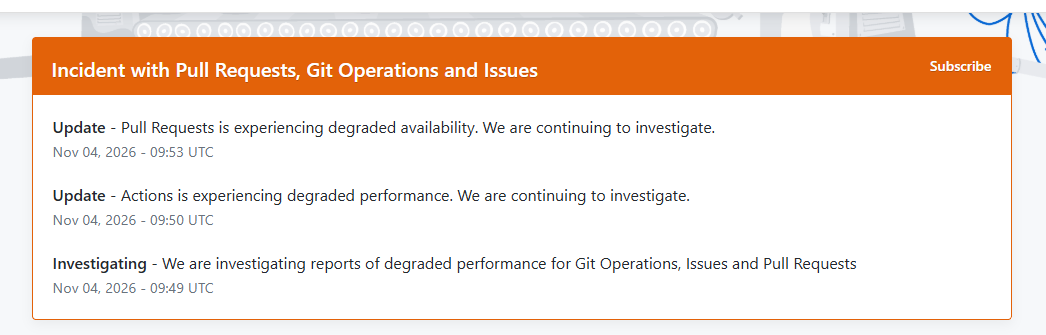
09:49 UTC: investigating reports of degraded performance affecting Git Operations, Issues, and Pull Requests.
09:50 UTC: Actions also began experiencing degraded performance.
09:53 UTC: Pull Requests became partially disrupted; GitHub kept investigating.
10:38 UTC: GitHub is investigating elevated errors and intermittent failures affecting GitHub, including Pull Requests, Git Operations, and Issues, and will keep users updated as it works toward mitigation.
11:11 UTC: API Requests is experiencing degraded performance; GitHub is continuing to investigate.
11:17 UTC: GitHub is working on mitigating elevated errors and intermittent failures affecting GitHub, including Pull Requests, Git Operations, and Issues; some requests may fail or be delayed while it works to restore service.
11:30 UTC: The degradation affecting API Requests, Git Operations, Issues and Pull Requests has been mitigated. GitHub is monitoring to ensure stability; Actions is still experiencing degraded performance.
11:43 UTC: The degradation affecting Actions has been mitigated. GitHub is monitoring to ensure stability.
11:50 UTC: This incident has been resolved. Thank you for your patience and understanding as we addressed this issue. A detailed root cause analysis will be shared as soon as it is available.
GitHub has not announced the cause of the incident.
The incident box on GitHub’s official status page: 3 updates from 09:49 to 09:53 UTC, still investigating.
Service status on GitHub’s official status page, 04/11/2026: Pull Requests partially disrupted, Git Operations, Issues, and Actions degraded.
How Does It Affect You?
If your pushes, pulls, or clones are failing or unusually slow, the cause is most likely on GitHub’s side, not your machine. Opening and viewing pull requests may fail, while Issues and Actions may be slower than usual.
Check GitHub’s official status page before changing settings or network configuration on your machine. If the work is not urgent, wait until GitHub announces the incident is resolved before pushing important code or running deployments through Actions.
Not the First Time in Two Days
Earlier the same day, GitHub had an incident in Copilot Mission Control: elevated errors (around 2.5%) when listing and creating tasks, from 08:45 UTC; GitHub deployed a fix and the incident was resolved at 10:01 UTC. Git Operations also experienced degraded performance from 20:57 to 22:41 UTC on 03/11 and was fixed.
Sources
The information in this article is based on GitHub’s official status page, last verified at 11:57 UTC on 04/11/2026. This article will be updated when new information is available.
Bạn có thể sử dụng tài khoản Google để bình luận. Google chỉ chia sẻ tên và địa chỉ email đã xác minh để hiển thị tên của bạn. Bạn có thể đăng xuất bất cứ lúc nào.
Binance was hacked for $6.3 billion, the largest exchange hack in history, starting from an engineer's laptop. A summary of the timeline and 6 security lessons for businesses.
AI code writing accounts for over 40% of pull requests on GitHub. An analysis of the latest figures and how developers and businesses can adapt to use AI effectively.
When working with Docker, you will frequently use four core concepts: Image, Container, Volume, and Network. Simply put, an image is the blueprint, and a container is the image running. A volume keeps data, while a network connects containers to each other. These four concepts follow an order: first the blueprint, then the running copy...





If your pull or push fails with a key error, it might not actually be a problem on your end.