What Is a Microservice? When to Use It and When Not To
G
GnurtFull-stack developer
7 min read
In this article
You have a small online shop, running on a single app. Everything sits in one folder, and one command brings the website up. Then you read somewhere that many large companies have split their systems into dozens of small services called microservices. You start wondering whether your shop should do the same.
In this article, we will answer a simple question — what is a microservice — and see how it differs from the familiar monolith approach. We will also discuss when you should — or should not yet — split. Throughout, I will use a small online shop as the running example. This is a made-up example, not a real system.
Quick summary
Microservices are many small services, each running separately, looking after one part of the work and calling each other over the network.
Splitting helps you deploy and fix each part separately. In return, you have to deal with network calls, distributed data, and operating more things.
With a small team and a new app, start from a monolith with clear modules.
What Is a Microservice?
Microservice is a way of building an application from many small services. Each service runs in its own process and handles one business area, such as accounts or orders. They are deployed independently and talk to each other over the network (I’ll cover how services call each other over the network in detail in a later article.)
The easiest way to picture it is to compare a single-kitchen restaurant with a food court. In a restaurant with one kitchen, every dish is cooked in the same shared kitchen. In a food court, each stall has its own kitchen and its own menu, and the stalls pass orders to each other when they need to.
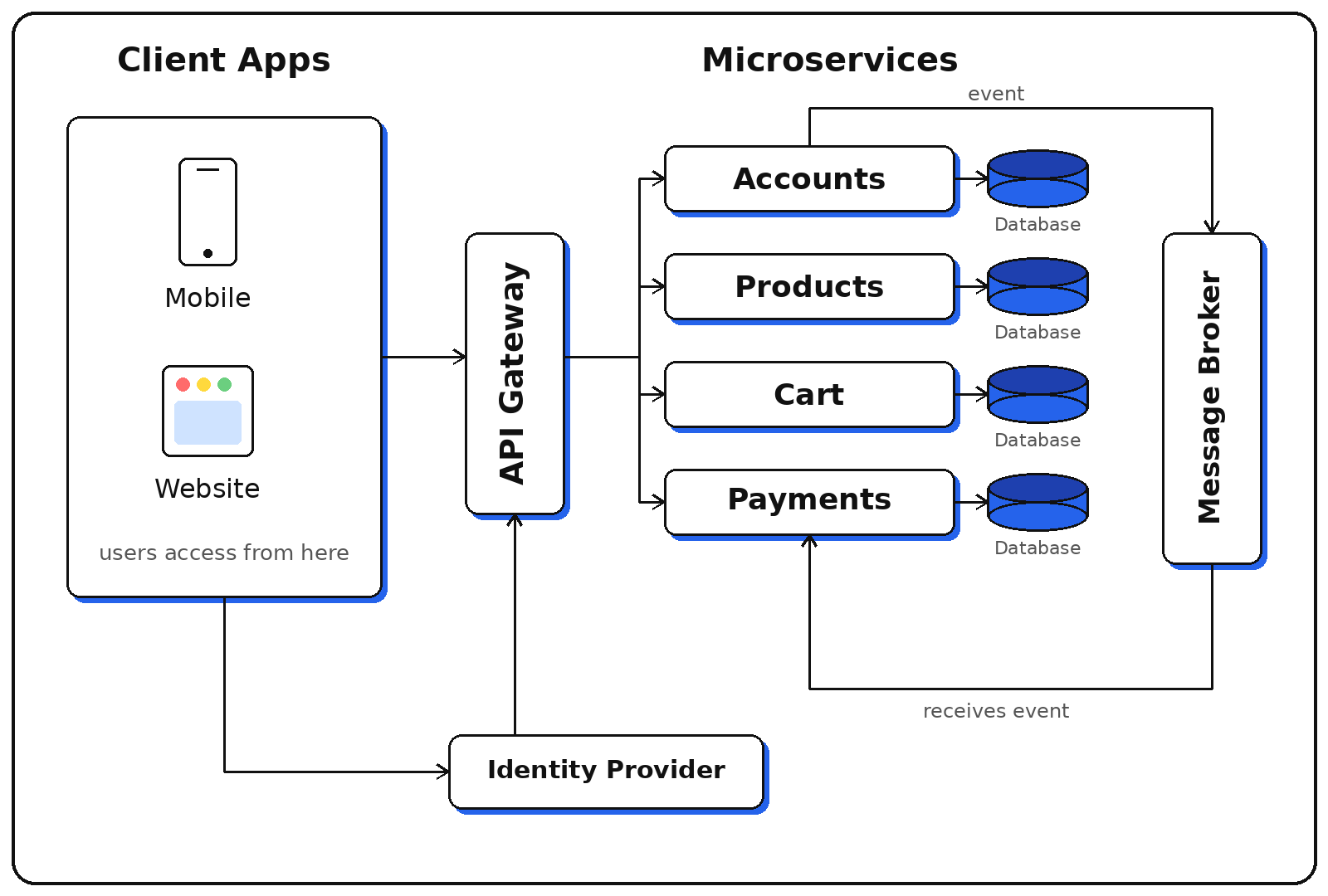
Take our online shop. It splits into four services: accounts, products, cart, and payments. Each one runs on its own and looks after its own part of the shop. For example, when a customer checks out, the payments service asks the cart service for the list of items to charge for.
Client apps send requests through the API Gateway to each service; services talk to each other through the Message Broker.
What Is a Monolith, and Is It Really Outdated?
The familiar approach above is called a monolith. The whole application is a single unit: it is built and deployed together, and it usually shares one database.
A monolith also gives you something very important: a database transaction. When a customer places an order, the shop saves the order, reduces stock, and writes a log — all in one transaction. Either everything succeeds, or everything fails together.
That is why the classic article on microservices by Martin Fowler and James Lewis repeats this advice: start with a monolith and keep it clearly modular. Split it only when the monolith genuinely becomes a problem.
The Benefits of Microservices
Independent deployment: fixing the payments service means deploying only that service, not the whole app.
One part failing does not bring down the whole system: if payments fail, browsing products and the cart still work.
Scale each part separately: whichever part is under heavy load gets more resources on its own.
Teams work independently and deploy without waiting for each other.
Each service can choose the technology that suits it best.
Small, easy-to-understand code: each service looks after one part of the work, so it is quick to read and new team members get up to speed faster.
Easy to replace one part at a time: to rewrite a service in another technology, you only redo that service, not the whole app.
Comparing with a Monolith
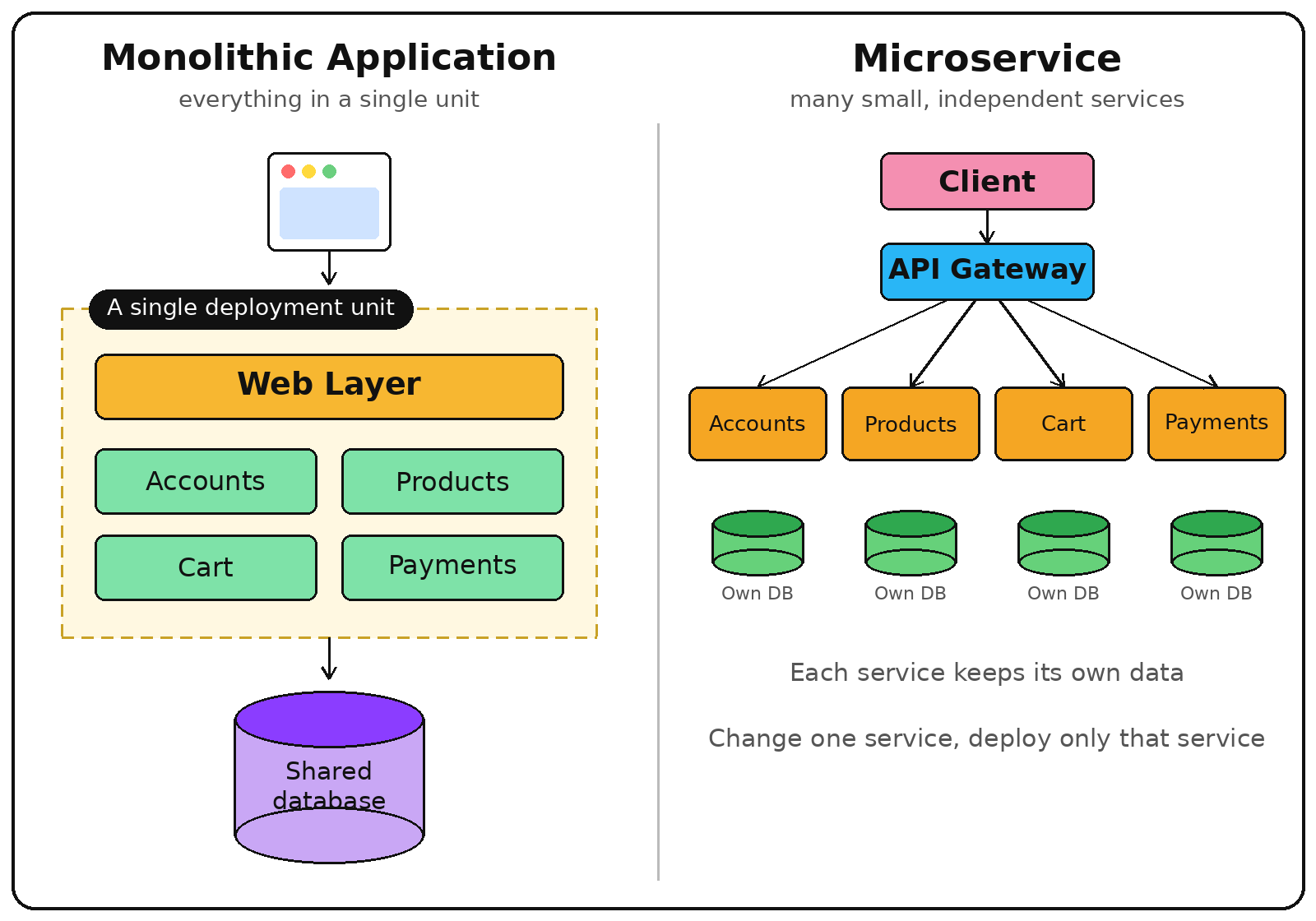
In short, you trade simplicity for the ability to separate things. The table below compares the two approaches using our online shop.
The same online shop: on the left, everything sits in a single unit (Monolith); on the right, each part is its own service with its own data.
Monolith
Microservice
Deployment
Fixing payments still means deploying the whole app.
Fixing payments means deploying only the payments service.
When one part fails
A serious failure can bring down the whole app.
The failure stays inside that service; the rest keeps running if it was designed to tolerate failure.
Calls between parts
A function call inside one process.
A call over the network: slower, and it can time out.
Data
One database.
Each service keeps its own data, and consistency arrives later.
Operations
One thing to run and monitor.
Many things to watch at the same time.
The data row is where newcomers are most often surprised. When orders and stock live in two services with two databases, you cannot wrap both in a single transaction. There may be a moment when the order has been created but the stock has not been reduced yet. The system only becomes consistent after a short while — this is called eventual consistency. And when something goes wrong, you need a compensating action to fix it.
When to Split, and When Not To Yet?
For this small online shop, my answer is not yet. This is my view, based on the costs in the table above. You should consider staying with a monolith when:
Your team has only a few people, because each service adds one more thing to build, deploy, and monitor.
The app is still new and the boundaries between its parts are not yet clear. Splitting in the wrong place costs more to fix than fixing it inside one app.
You do not yet have basic CI/CD and monitoring for one app. With many services it will be even harder.
On the other hand, consider splitting when:
One part needs to scale very differently from the rest — for example, image processing eats up CPU while the rest of the app does not.
Many teams need to deploy independently and do not want to wait for each other.
One part needs a different technology, and you do not want that to affect the whole app.
Microservices solve the problems of large systems and large organisations. If you do not have those problems yet, you are paying the cost without getting the benefit.
Next Step
Before you split anything, draw the parts of your app on paper and join the parts that call each other with a line. The part with the most lines is the hardest to split. It also shows you where the service boundaries should be. Once you have the drawing, (Coming soon) will show you how services call one another.
Frequently Asked Questions
Do microservices have to use Docker or Kubernetes?
No. The only requirement is that each service runs in its own process and is deployed independently. That said, containers are very handy because each service is packaged separately. Kubernetes (or K3s) helps manage many containers at once. Both are explained in later articles in this series.
Do microservices run faster than a monolith?
Not by default. A call over the network is slower than a function call inside one process. The benefit is that you can scale the parts that need more resources separately, not that each call is faster.
What is a modular monolith?
It is an application that still runs as one unit, but whose code is divided into modules with clear boundaries. That way, you have less to rewrite from scratch if you need to split it later. Even so, a good boundary inside one process usually still needs adjusting. When you split, that boundary becomes the boundary between two services.
Picture this: your laptop is at home, your phone is with you, and a server sits somewhere else. To open the server’s admin page from outside, you usually have to open a port on your router — which means configuring the router and leaving that port exposed to the internet. Tailscale skips that step: it connects...
This article is a quick reference for the Docker commands beginners use most. The commands are grouped by task and shown with real examples. You’ll learn which command to use when, how to check things and clean up, and how to fix common errors. It sticks to the basic commands beginners usually need, and doesn’t go...
In the previous article, you wrote a Dockerfile for a small web app, built it into an Image, and ran a Container. This article uses that same app and Dockerfile. You will run the app and MySQL together with Docker Compose, in a single command (docker compose up). Make sure Docker is installed. If it isn’t...







Comments
You can use your Google account to comment. Google only shares your verified name and email address to display your name. You can log out at any time.
Sign in with GoogleNo comments yet. Be the first!